Overview
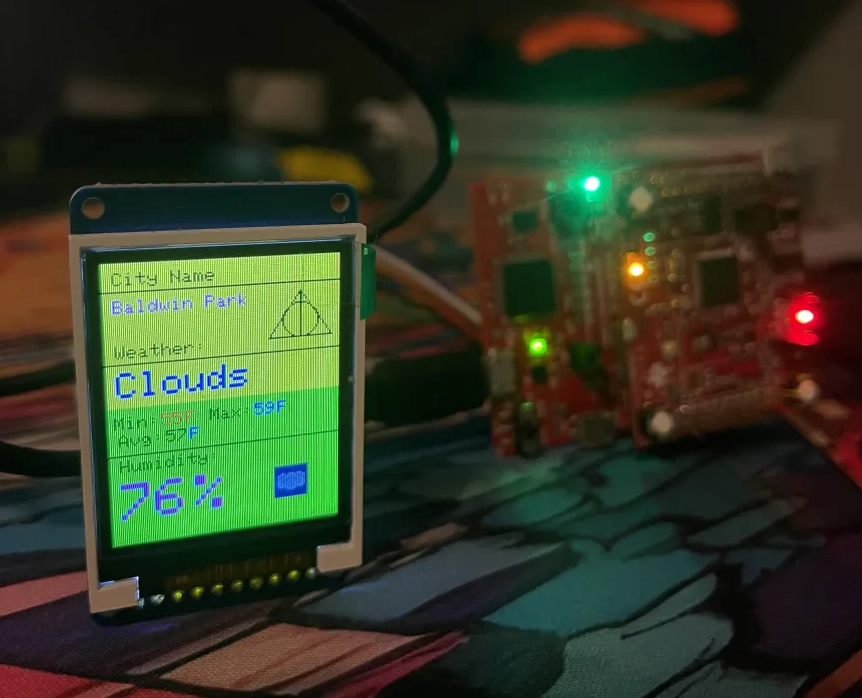
CECS 447 project at Cal State Long Beach, built with Roy Mears, Jonathan Ramirez, and Luis Arevalo. We developed an IoT-based embedded weather station that connects to the internet over WiFi, queries the OpenWeatherMap API, parses the JSON response on a bare-metal ARM microcontroller, and displays the results on both a serial terminal and a color LCD with animated weather icons.
The system uses a TM4C123 LaunchPad paired with a CC3100 Booster Pack for WiFi connectivity, and an ST7735R 1.8" color LCD driven over SPI for the visual display. The user selects a query type through a serial terminal, and the system fetches and renders live weather data — city name, current temperature, min/max, humidity, and weather condition — all running on a 16 MHz ARM Cortex-M4 with no operating system.
How It Works
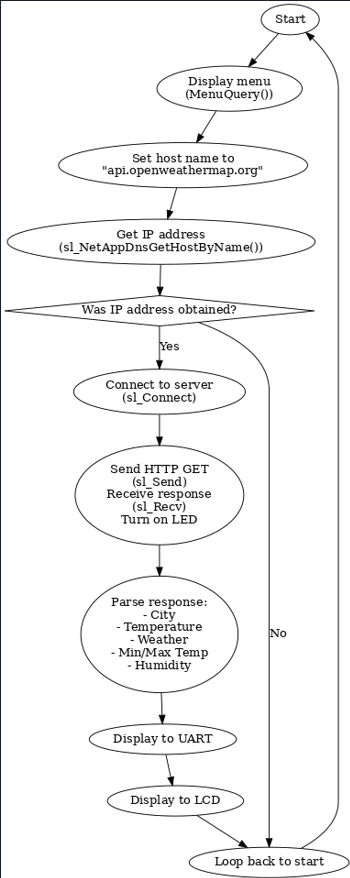
The system follows a straightforward pipeline that loops continuously:
- Display menu on the serial terminal — user picks a query type (city name, city ID, geographic coordinates, or zip code)
- Build HTTP GET request — the
MenuQuery()function formats the user input into a valid OpenWeatherMap API URL - DNS resolution —
sl_NetAppDnsGetHostByName()resolvesapi.openweathermap.orgto an IP address - TCP connection —
sl_Connect()opens a socket to the API server - Send request / receive response —
sl_Send()transmits the HTTP GET,sl_Recv()captures the full JSON response - Parse JSON — Custom string parsing extracts
name,temp,temp_min,temp_max,humidity, andmainfields from the raw JSON - Display on UART — Full JSON response and formatted summary printed to the serial terminal at 115200 baud
- Display on LCD — Formatted weather data rendered on the ST7735R with multiple font sizes, colors, shapes, and animated weather icons
- Loop — Return to menu for the next query
Hardware
TM4C123 LaunchPad + CC3100 Booster Pack
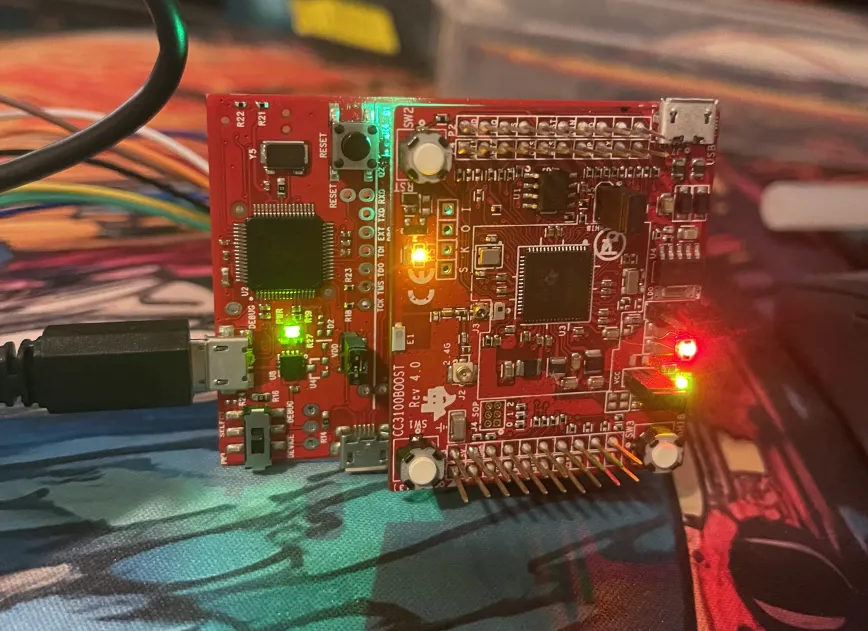
The TM4C123GXL is a Texas Instruments ARM Cortex-M4 development board running at 16 MHz. The CC3100 Booster Pack stacks on top and provides full WiFi connectivity with an onboard TCP/IP stack — the microcontroller sends high-level SimpleLink API calls and the CC3100 handles all the wireless protocol details.
The CC3100 communicates with the TM4C123 over SPI. The SimpleLink library provides functions for WiFi connection, DNS resolution, socket management, and HTTP communication — all callable from bare-metal C.
ST7735R Color LCD
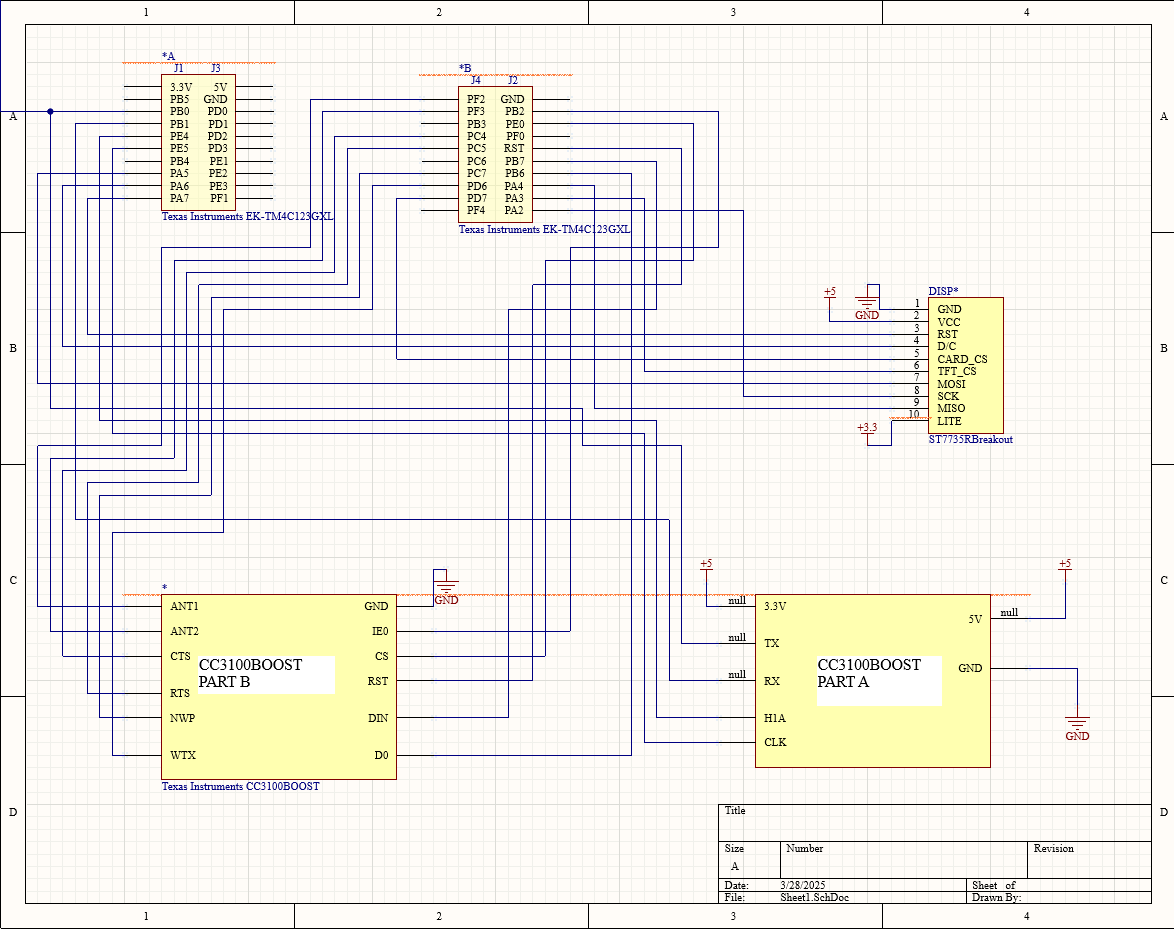
The 1.8" ST7735R TFT display (128x160, 16-bit color) connects over SPI to the TM4C123:
- SCK on PA2 (SSI0Clk)
- MOSI on PA5 (SSI0Tx)
- TFT_CS on PA3 (SSI0Fss)
- Data/Command on PA6 (GPIO)
- Reset on PA7 (GPIO)
The LCD driver provides functions for drawing text at multiple sizes, pixels, lines, circles, diagonal lines, filled rectangles, and bitmap images — all used to compose the weather display layout.
Schematic
Software Architecture
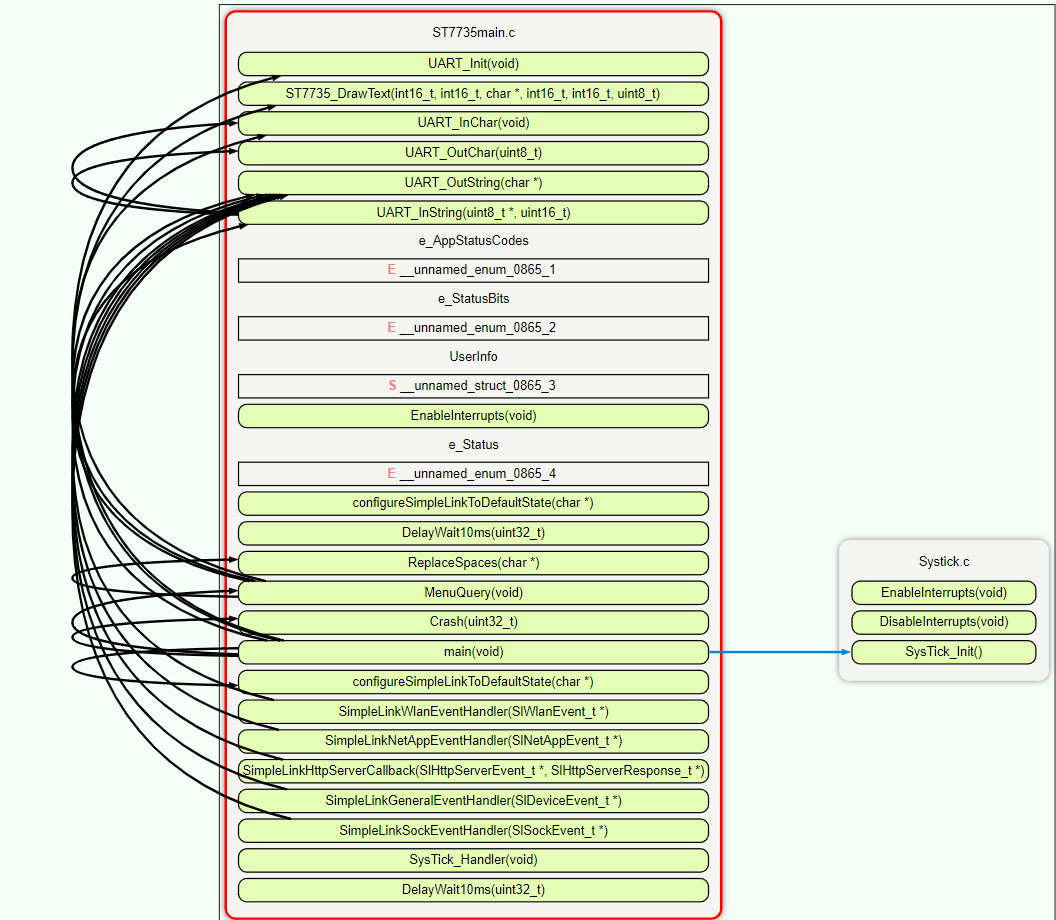
The firmware is organized into modular C files:
ST7735main.c — Main Application
The core module handles everything: WiFi initialization, user input, HTTP communication, JSON parsing, and LCD rendering. Key functions:
configureSimpleLinkToDefaultState()— Resets the CC3100 to a known stateMenuQuery()— Presents the serial menu and formats the HTTP GET request stringmain()— Main loop that connects WiFi, sends queries, parses responses, and updates displaysSysTick_Handler()— Interrupt handler that cycles through animation frames at 10 Hz
JSON Parsing
Since this is bare-metal C with no JSON library, parsing is done by searching for specific tokens in the raw response string. The code locates keys like "name", "temp", "temp_min", "temp_max", "humidity", and "main", then extracts the values that follow. Temperatures are converted from Kelvin to Fahrenheit before display.
Serial Terminal Output
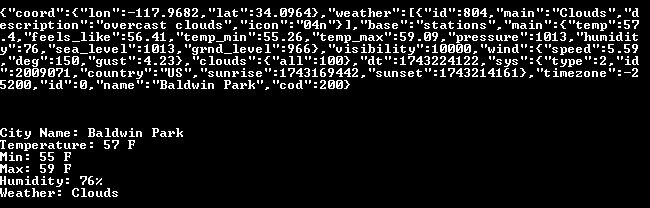
The UART output shows both the complete raw JSON from OpenWeatherMap and a clean formatted summary with city name, temperature (current, min, max), humidity, and weather condition. This runs at 115200 baud through the TM4C123’s built-in USB-to-serial interface.
Systick.c — Animation Timer
The SysTick timer is configured with a reload value of 1,600,000 (10 Hz at 16 MHz) and priority 2:
void SysTick_Init(){
  NVIC_ST_CTRL_R = 0;
  NVIC_ST_RELOAD_R = 1600000-1;  // 10 Hz at 16 MHz
  NVIC_ST_CURRENT_R = 0;
  NVIC_SYS_PRI3_R = (NVIC_SYS_PRI3_R&0x1FFFFFFF)|0x40000000;
  NVIC_ST_CTRL_R |= NVIC_ST_CTRL_CLK_SRC|NVIC_ST_CTRL_INTEN|NVIC_ST_CTRL_ENABLE;
}
Every 100ms, the SysTick_Handler in ST7735main.c advances the animation frame counter and draws the next bitmap for the current weather condition. This hardware-based timing ensures smooth animations without blocking the main loop’s network communication or data parsing.
LCD Display Design
The LCD layout is split into distinct zones with multiple visual elements:
- Header — City name in small text with a weather icon animation area
- Weather condition — Large bold text (“Clouds”, “Clear”, “Rain”) in a contrasting color
- Temperature — Min, Max, and Average displayed with different text sizes
- Humidity — Large percentage display at the bottom
- Graphics — Horizontal/vertical divider lines, a circle, and a diagonal line as required design elements
- Two background colors — Upper section uses a light tone, lower section uses green for visual separation
Weather Animations
Three sets of pre-defined bitmap frames stored in bmps.h:
- Clear — Sun animation cycling through frames
- Clouds — Cloud shapes shifting position
- Rain — Raindrop animation with falling pattern
The SysTick_Handler selects which animation set to use based on the parsed "main" weather condition field, then cycles through the frames using ST7735_DrawBitmap() at 10 Hz.
Query Types
The system supports four methods for looking up weather data:
- City Name — e.g., “Los Angeles” or “Baldwin Park”
- City ID — OpenWeatherMap’s numeric city identifier
- Geographic Coordinates — Latitude and longitude
- Zip Code — US zip codes (e.g., 91706)
Each query type formats a different HTTP GET URL parameter, but all hit the same OpenWeatherMap API endpoint and return the same JSON structure.
What I Learned
- Bare-metal networking is surprisingly approachable with the CC3100’s SimpleLink API — it abstracts TCP/IP but you still manage sockets, DNS, and HTTP manually
- JSON parsing without a library forces you to really understand string manipulation in C and handle edge cases carefully
- SPI display rendering at the pixel level gives you total control but requires careful buffer management to avoid flicker
- SysTick interrupts for animations are a clean way to handle periodic tasks without blocking — this pattern carries directly to RTOS timer tasks
Tech Stack
- MCU: TM4C123GXL (ARM Cortex-M4, 16 MHz)
- WiFi: CC3100 Booster Pack (SimpleLink API)
- Display: ST7735R 1.8" TFT LCD (128x160, SPI)
- Language: C (bare-metal, no RTOS)
- Protocols: SPI (LCD), UART (serial terminal), TCP/IP + HTTP (WiFi)
- API: OpenWeatherMap (JSON response)
- IDE: Keil uVision